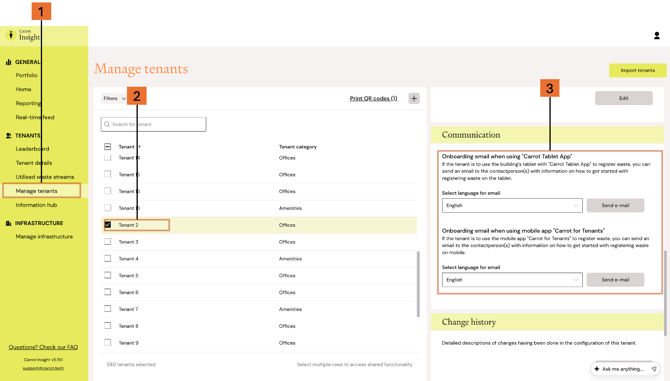
You can send an onboarding e-mail directly to a tenant from Carrot Insight. This onboarding e-mail includes information on how to register waste using Carrot as well as how to get access to tenant waste data. The e-mail also includes the tenant's unique company code, which is needed to log into Carrot for Tenants.
To send an onboarding e-mail:
- Open Manage tenants from the left-hand menu
- Select the tenant you want to send onboarding information to
- Use the Communication panel to send the onboarding email (choose mode of registration and language)
Please note that the e-mail is sent to the contactperson(s) registered under "Contact persons".
Use this feature when a new tenant needs access to the app or web portal, or when an existing tenant needs the onboarding information sent again.