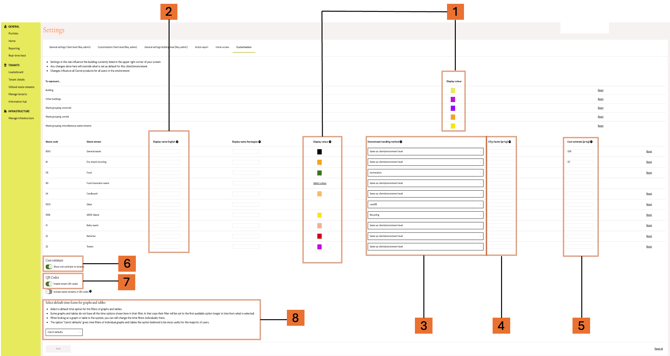
Under the Customisation tab in Settings, you can manage settings for the building currently selected in the upper-right corner of the screen.
This includes:
- Display colours for building, other buildings, waste grouping sorted/unsorted/miscellaneous/individual waste streams
- Display names per waste stream
- Downstream handling method per waste stream
- CO2 factor (per kg) per waste stream
- Cost estimate (per kg) per waste stream
- Whether to show cost estimate to tenants
- Whether to enable tenant QR codes
- The default time frame for graphs and tables
Changes made here override what is set as default at a portfolio level.
Changes made here influence all Carrot products for all users for this building.