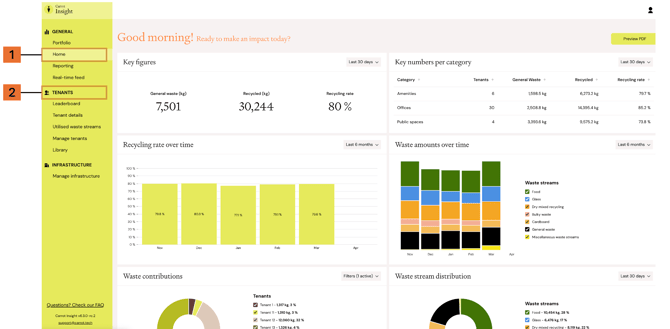
Carrot Insight is structured around buildings and tenants, and navigating the platform is mainly about moving between these two levels.
Most users start with a high-level overview of a portfolio or a building, and then move into more detailed tenant-level insights to understand what drives the results.
We recommend signing up for the bi-weekly Action Reports, which are delivered in your inbox with clear and actionable waste data insight. You can manage recipients for Action Reports in Settings.
Building overview (General)
To get an overall understanding of performance, start on the Home or Portfolio page.
Here you get a holistic view of how your building (or portfolio) is performing. This is where you can:
- See overall waste performance and key metrics for the entire building
- Identify trends and anomalies at a glance
- Quickly understand whether performance is improving or declining over time
This view helps you spot where to focus next.
Tenants
Once you have an overview, you can navigate to the Tenants section to explore the data in more detail.
Here you can:
- View individual tenant results and benchmarks
- Compare tenants against each other
- Identify high and low performers within the building
This is where you go to understand what is driving the overall results.